
Smart Shopping
Shopping Lists That Write Themselves
Add what your recipes are missing to a list grouped by aisle. Know exactly what to buy and never forget an ingredient.
Stop wandering the aisles wondering what you need. Smart shopping lists make grocery trips faster and more efficient.
Free on the App Store and Google Play
From Recipe to Shopping List in Seconds
Pick your meals and Pantry Pic adds what you still need to buy, minus what you already have.
Recipes and planned meals show how many ingredients you are missing. One tap adds them to your list.
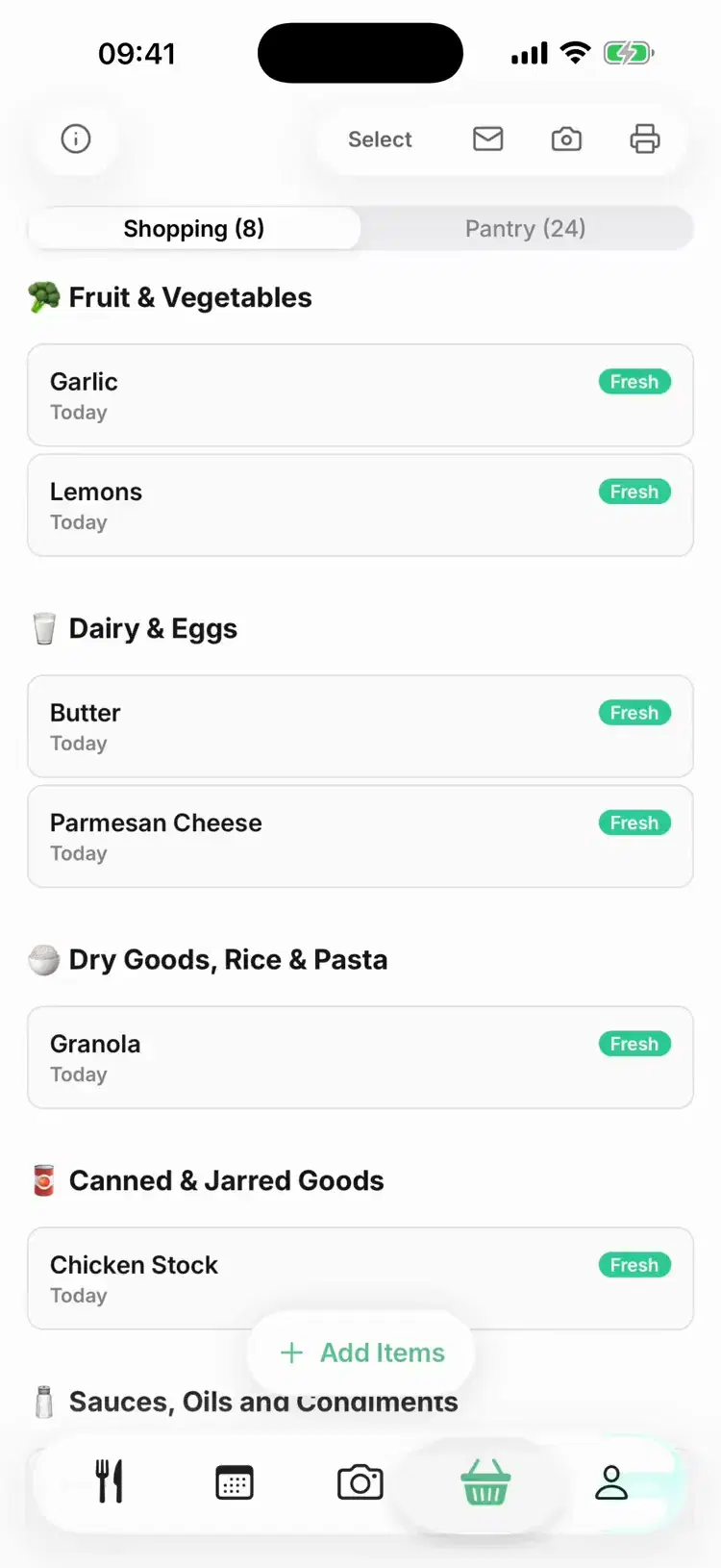
Items are grouped by aisle, from fruit and vegetables to dairy and eggs, so you can shop without backtracking.
If an item is already on your list, adding it again keeps one row instead of two.
Organised by Store Section
Shop aisle by aisle without backtracking
🥬 Fruit and vegetables: All your fresh produce grouped together
🥛 Dairy and eggs: Milk, cheese, yoghurt and eggs
🥩 Meat and seafood: Your proteins in one place
🥫 Dry goods, cans and sauces: Rice, pasta, tins, oils and condiments
Shopping Features
Built for Real Shopping Trips
Every feature is designed to make your time at the store faster and more organised.
Tap an item to tick it off. Ticked items drop to the bottom of their aisle, so you can see what is left. Hold an item to edit it.
Need cat food or paper towels? Type any item onto your list, not just recipe ingredients.
Scan the barcode on packaged food to add it to your list in seconds.
Prefer paper? Print your shopping list. Ticked items are left off.
Once you have ticked items off, add what you bought to your pantry so your next recipes know about it.
Shopping Made Simple
See how the smart shopping list keeps you organised at the store
Common Questions
Smart Shopping FAQ
Learn how the smart shopping list helps you shop smarter
Cook Something Amazing with What You Already Have
Join the movement to reduce food waste and make mealtime easier. Pantry Pic turns your pantry into a recipe book, one snap at a time
Download Pantry Pic directly from your preferred app store:


Free version available • Upgrade anytime
