
Dietary Customization
Recipes Tailored to Your Diet
Vegan, gluten-free, keto, paleo or a mix. Set your dietary preferences once and every recipe Pantry Pic builds follows them.
No more scrolling past recipes you can't eat. Pantry Pic remembers your dietary requirements and builds meals that work for you.
Free on the App Store and Google Play
Personalised Recipes in Three Steps
Set your preferences once and get recipes that fit
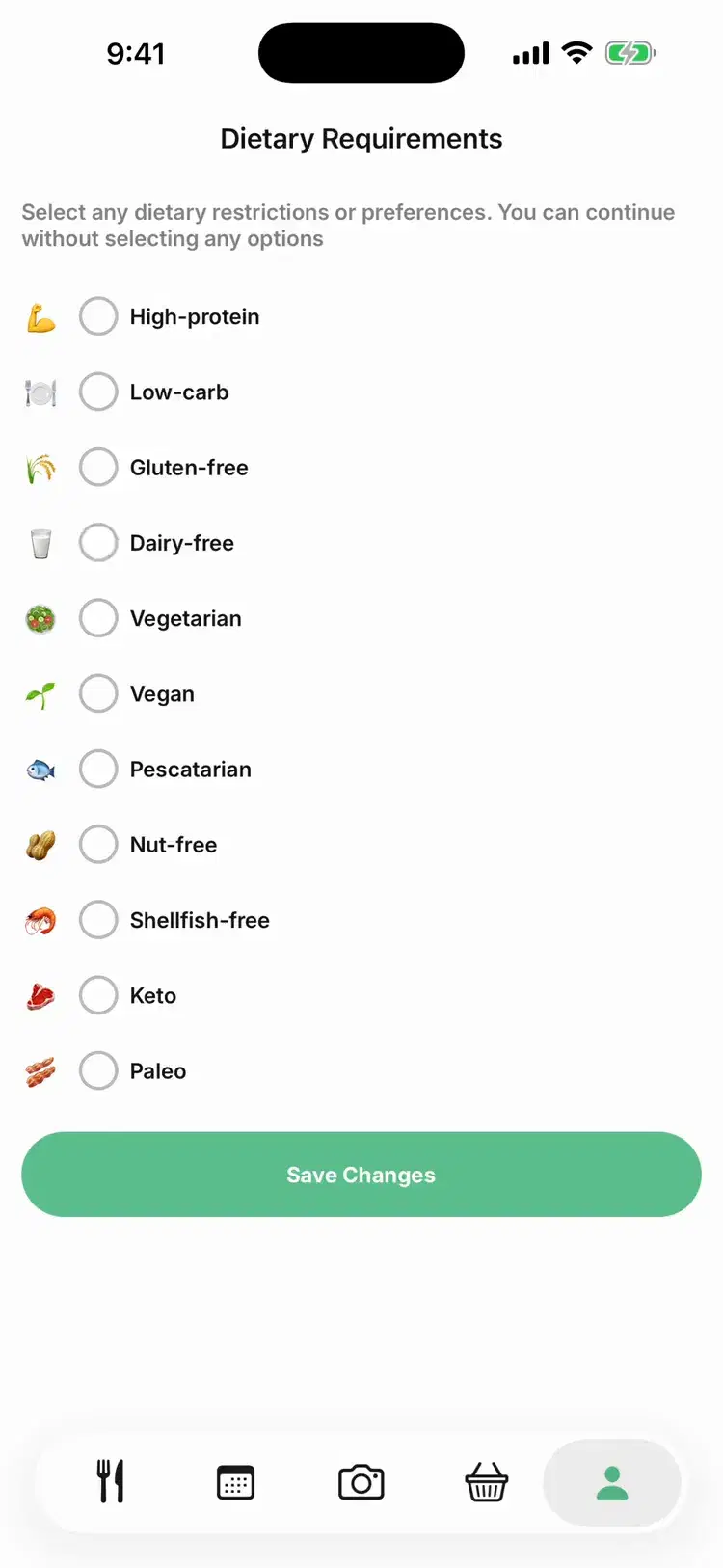
Pick from 11 options in three groups: your eating style, foods to leave out and nutrition goals. Combine them as you need.
Scan your ingredients as usual. Every recipe Pantry Pic builds follows your dietary settings.
Recipes are built around your preferences and show dietary tags, so you can see which ones they meet.
11 Dietary Options
Find Recipes for How You Eat
Whether you're plant-based, leaving something out or following an eating plan, set it once and Pantry Pic keeps to it.
Vegetarian, vegan or pescatarian
High-protein, low-carb, keto and paleo
Gluten-free, dairy-free, nut-free and shellfish-free
Tell Pantry Pic how confident you are and recipes match your skill
How It Works
Dietary Preferences That Actually Work
Your preferences shape every recipe Pantry Pic builds, rather than only hiding results after the fact.
Set your dietary requirements once in Settings. Every scan and every new recipe follows them.
Need vegan and gluten-free? Keto and dairy-free? Combine preferences and get recipes that meet all of them. Vegetarian, vegan and pescatarian are pick one.
Pick gluten-free, dairy-free, nut-free or shellfish-free and recipes are built without them. Always check labels if you have a serious allergy.
Every recipe shows dietary tags at a glance, like Vegan, GF or Keto. You can also filter your recipes by dietary tag.
Your preferences show right before you get recipes, with an Edit button if you are cooking for someone else.
Popular Dietary Preferences
See how Pantry Pic adapts to the most requested diets
Completely plant-based recipes with no animal products.
Recipes built without wheat, barley or rye. If you have coeliac disease, always check product labels.
Low-carb, higher-fat recipes, with carbs, fat and protein shown per serving.
See Dietary Filtering in Action
Watch how preferences transform your recipe suggestions
FAQ
Dietary Preferences FAQ
Answers to the most common questions about Pantry Pic
Cook Something Amazing with What You Already Have
Join the movement to reduce food waste and make mealtime easier. Pantry Pic turns your pantry into a recipe book, one snap at a time
Download Pantry Pic directly from your preferred app store:


Free version available • Upgrade anytime
