
Photo to recipe app
Build a Recipe With the Ingredients You Have — Just Snap a Photo
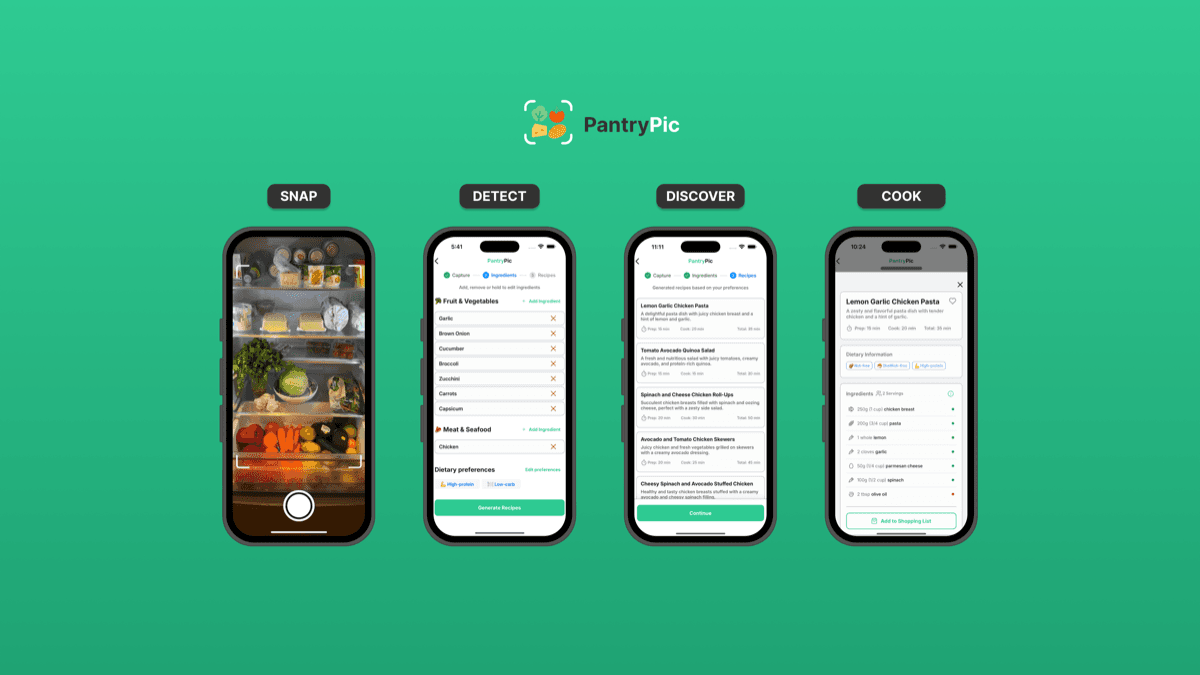
Snap a photo of your pantry or fridge, fine-tune the detected ingredients and instantly get recipes, meal ideas and smart shopping lists that help you save money and reduce food waste.
Instant recipes, smart lists, and less food waste from one photo
Free to start, no credit card required
Loved by home cooks reducing food waste worldwide
How It Works: 5 Simple Steps
Snap a photo of your pantry or fridge
Instantly detects what you have
Get personalised meal ideas
Add only missing items
Build a recipe with your ingredients
Build a recipe with your ingredients
Whether it's a packed pantry or a few odds and ends, Pantry Pic builds recipes from exactly what's on hand. Snap a photo, fine-tune the detected ingredients and get meals you can cook right now — like a recipe finder by ingredients, minus the typing.
Add or remove ingredients after the scan so recipes match what's really there
Get meal ideas that use up what you have before it expires
Free to start with 4 scans per month
Smart ingredient detection
Smart ingredient detection
Take a photo of your fridge, pantry, or leftovers. Pantry Pic instantly detects your ingredients and lets you edit, add, or remove items before generating recipes.
Recognises common pantry staples and fresh produce
Supports multiple photos for better accuracy
Learns over time from your cooking habits
Ready to Clear Your Pantry?
Download Pantry Pic directly from your preferred app store:


Recipe generator
Recipe generator
Turn detected ingredients, dietary preferences and cooking skill level into personalised recipes you can actually cook tonight. It works as a recipe finder by ingredients, suggesting dishes from what's already in your kitchen.
Adjust recipes based on who you’re cooking for
Filter by cuisine, time to cook, and difficulty
Save your favourite recipes and share them with friends
Smart shopping lists
Smart shopping lists
Missing ingredients from a recipe can be added instantly to a shopping list so you never forget what to buy.
Auto-add missing ingredients from any recipe
Keep separate lists for different stores or households
Share lists with family or housemates

Reduce food waste
Reduce food waste
Use what you already have before it expires, inspire use-it-up meals, and save money each month on groceries.
Households around the world throw away food that could have become dinner. Pantry Pic helps turn forgotten ingredients into meals.
Comparing photo-to-recipe with the type-it-in alternatives? See our 2026 breakdown of the best apps for finding recipes from the ingredients you have.
Start Cooking Smarter Today
Download Pantry Pic directly from your preferred app store:
FAQ
Frequently asked questions about photo to recipe apps
Answers to the most common questions about Pantry Pic
Cook Something Amazing with What You Already Have
Join the movement to reduce food waste and make mealtime effortless. Pantry Pic turns your pantry into a recipe book — one snap at a time
Download Pantry Pic directly from your preferred app store:
Free version available • Upgrade anytime
